In the first part of this series, I gave an overview of my rebuilt home server. One sentence carried most of the weight: everything is defined in a single Git repository and deploys itself. This article shows how that works, from a commit to a running container. It also covers a problem I found while writing part 1, and why my server now only deploys what I’ve approved.
TL;DR#
18
apps
1 h
update interval
0
open ports
1
approval
Everything my home server runs is described in one Git repository: which apps, how they are configured, and their passwords, encrypted. Once an hour, the server checks the repository for changes and applies them by itself. I never log in to the server to change anything by hand.
Most changes are written by AI agents or by a bot that keeps the apps up to date. But nothing goes live until I’ve reviewed and approved it, either with a signature on my Mac or with one tap on my phone. Without that approval, the server ignores the change.
Why GitOps for a Home Server#
In my old setup, Ansible configured the operating system, but I created the Docker containers by hand. My argument back then: a one-time step that restic backs up anyway. That was true, but the real state of my server lived on the server. Which compose file was current? Which environment variable did I change last spring, and why? The server knew. I didn’t.
GitOps turns that around. The repository describes the desired state, and an automated process makes the server match it. For a home server, this has three big benefits:
- The server is disposable. If the SSD dies, I reinstall Proxmox and redo its few settings by hand, like the firewall rules and the backup job. Then I create a fresh VM and run a bootstrap script in it. From there, the server rebuilds itself from Git. restic brings back the data.
- Every change has a history. Each commit explains what changed and why. That’s useful for me and essential for the AI agents that write most of these commits.
- Nothing changes by hand. If it’s not in Git, it gets overwritten on the next run. That’s annoying exactly once, and then you stop doing it.
The Building Blocks#
Before going into details, here is what each tool does in my setup. None of them is new or exotic. The interesting part is how they work together.
Git and GitHub
main. GitHub stores the repository and hosts pull requests.Ansible
Docker Compose
SOPS and age
Komodo
Dependabot
In one sentence: Git holds the truth, Ansible prepares the server, SOPS keeps the passwords safe, Komodo runs the containers, and Dependabot proposes updates.
How the Repository Is Organized#
The repository has two halves. ansible/ describes the host: packages, firewall, Docker, DNS, backups. stacks/ describes the applications. Each stack is a directory with the same structure:
stacks/tandoor/
├── compose.yml              # the Docker Compose file Komodo deploys
├── meta.yml                 # paths, owners, start page entry
├── .env                     # non-secret defaults
├── README.md
└── secrets/
    ├── owner.env            # who owns the decrypted secret files
    └── secrets.yml.sops     # encrypted secrets
Some stacks also have a pre-deploy.sh that prepares files the container needs before it starts. I’ll get to it in the secrets section.
There’s no hidden state outside this structure. Komodo’s own configuration lives in the repository, too, in komodo/resource-sync.toml.
Ansible Pull, Every Hour#
Ansible usually works in push mode: you run a playbook on your laptop, and Ansible connects to the server via SSH. I use pull mode instead. A systemd timer on the homeserver fetches the repository and runs the playbook locally:
# /etc/systemd/system/ansible-pull.timer
[Timer]
OnBootSec=5min           # first run shortly after boot
OnUnitActiveSec=1h       # then every hour
Persistent=true          # catch up on missed runs
The server clones the private repository with a read-only deploy key. It can read the repository, but not write to it. No personal access token to rotate, no credentials in a CI system.
The playbook runs 16 roles in a fixed order. Shortened:
- Base system: updates, firewall, Docker, time sync, SSH hardening, local DNS resolver, and the SMB mount for media from the NAS.
- sops-runtime: installs age and SOPS and fails loudly if the decryption key is missing.
- stacks-prereqs: reads every
meta.ymland creates directories and the start page. - Host services: Komodo’s agent, push notifications, restic backups.
- ansible-pull-timer: the role that installs the timer above. Yes, it manages itself.
- stack-secrets: decrypts the secrets of changed stacks.
- komodo-autodeploy: redeploys the changed stacks. Always last.
The order matters. Secrets are decrypted before anything is deployed, and if decryption fails, the play aborts. A container never starts with stale secrets.
meta.yml: What Docker Compose Doesn’t Know#
A compose file describes containers. It doesn’t create the directories it mounts, and it doesn’t know who should own them. If Docker creates a missing bind mount directory (a folder on the host that is mounted into the container), it belongs to root, and a container running as UID 1000 can’t write to it.
That’s why every stack has a meta.yml. Its paths section tells Ansible which directories to create, with which owner and mode:
# stacks/tandoor/meta.yml (excerpt)
paths:
  - { path: /srv/tandoor/staticfiles, owner: 1000, group: 1000, mode: "0750" }
  - { path: /srv/tandoor/mediafiles, owner: 1000, group: 1000, mode: "0750" }
  - { path: /srv/tandoor/postgres, owner: 999, group: 999, mode: "0700" }   # Postgres runs as UID 999
The stacks-prereqs role reads these entries from every stack and creates the directories before any container starts.
The Start Page Builds Itself#
meta.yml has a second job: it describes how a stack appears on my Glance start page. That’s the page I open to reach all my apps, with a status indicator for each one.
# stacks/tandoor/meta.yml (excerpt)
dashboard:
  - name: Rezepte (Tandoor)                # German for "recipes"
    url: https://rezepte.home.dominikbritz.de
    check: http://tandoor:8080/openapi    # internal health check, bypasses the proxy
    icon: tandoor-recipes
    group: Alltag                         # start page group ("everyday")
The same role collects these entries from all stacks and renders one services file for Glance. Glance reloads it automatically. A new stack shows up on the start page with a status indicator, without me touching the dashboard.
Secrets: Encrypted in Git, Decrypted on the Server#
Secrets live in the repository, encrypted with SOPS and age. SOPS encrypts YAML files, and a .sops.yaml in the repository root defines which files get encrypted with which key. Stack secret files are encrypted completely. For Ansible variables, only keys that look like secrets (password, token, api, and so on) are encrypted, so the rest of the file stays readable in diffs.
The age private key exists in three places: on the server, in my password manager, and on paper in a safe. It’s not on the codebox, the VM where my AI agents work. Agents can write encrypted secrets but never read them.
The stack-secrets role decrypts each stack’s secrets.yml.sops and writes one file per key to /srv/secrets/<stack>/:
/srv/secrets/tandoor/
├── django_secret_key
├── postgres_password
└── socialaccount_providers_json
The files belong to the user and group from the stack’s owner.env, so the container can read them without running as root. /srv/secrets itself is readable only by root. Temporary plaintext files go to /dev/shm, which lives in memory, and get shredded afterwards.
One file per key fits a convention many images support: if you append _FILE to a variable name, the container reads the value from that file instead of the environment.
# stacks/tandoor/compose.yml (excerpt)
environment:
  POSTGRES_PASSWORD_FILE: /secrets/postgres_password
  SECRET_KEY_FILE: /secrets/django_secret_key
volumes:
  - /srv/secrets/tandoor:/secrets:ro
Not every app supports _FILE variables. For those, a stack can bring a pre-deploy.sh. It runs right after decryption and builds whatever the app needs, typically an .env file assembled from the decrypted values.
To avoid touching anything unnecessarily, the role stores a checksum per stack. If the encrypted file, owner.env, and pre-deploy.sh haven’t changed, nothing happens.
Komodo as a Dumb Executor#
I use Komodo to run the Docker stacks. It has a nice UI, real-time stats, and alerts. But in my setup, it has deliberately little say. It doesn’t clone the repository and doesn’t decide anything. It deploys what Ansible has already put on the disk:
# komodo/resource-sync.toml (one of 18 stacks)
[[stack]]
name = "tandoor"
tags = ["pr-updates"]
[stack.config]
server = "homeserver"
files_on_host = true                              # use the files ansible-pull checked out
run_directory = "/srv/homeserver/stacks/tandoor"
file_paths = ["compose.yml"]
project_name = "tandoor"
extra_args = ["--force-recreate"]                 # secrets are bind mounts, see below
files_on_host = true is the key line. There is exactly one Git consumer on the server: ansible-pull. If Komodo disappears tomorrow, the containers keep running, and I can start any stack with docker compose up -d from the same directory. Nothing in the file layout knows about Komodo.
--force-recreate is necessary for stacks that read secrets from bind mounts. If only a secret file changes, docker compose up -d sees an unchanged compose file and does nothing. Forcing the recreate makes the container pick up the new value.
Which Stacks Changed?#
The last Ansible role, komodo-autodeploy, connects Git and Komodo. It remembers the last commit it deployed successfully, asks Git what changed in stacks/ since then, and calls Komodo’s API for each changed stack. Shortened:
head_sha="$(git -C "$REPO" rev-parse HEAD)"

# First run: no baseline yet. Set it, but don't deploy (otherwise every stack would redeploy).
if [[ ! -f "$STATE_FILE" ]]; then
  echo "$head_sha" > "$STATE_FILE"
  exit 0
fi

last_sha="$(cat "$STATE_FILE")"
changed="$(git -C "$REPO" diff --name-only "$last_sha" "$head_sha" -- stacks/)"
mapfile -t stacks < <(printf '%s\n' "$changed" | awk -F/ '$1=="stacks" && NF>=2 {print $2}' | sort -u)

failed=()
for s in "${stacks[@]}"; do
  deploy_stack "$s" || failed+=("$s")   # POST /execute DeployStack, then poll until complete
done

if [[ -z "${failed[*]:-}" ]]; then
  echo "$head_sha" > "$STATE_FILE"      # only advance when everything worked
else
  notify_fail "Deploy failed: ${failed[*]}"   # push notification, retry on the next run
fi
exit 0
Two details make this robust. The state only advances when every deploy succeeded, so a failed stack is retried on the next run automatically. And the script always exits with 0: a broken container must never stop Ansible from configuring the rest of the host. The script talks to Komodo’s API on localhost, so none of this needs an open port.
Updates: Dependabot Instead of Watchtower#
In the old setup, Watchtower pulled new images whenever they appeared. Convenient, but I never knew what changed until something broke.
Now almost every image is pinned to a version and a digest, for example postgres:16@sha256:1a6a…. The digest is a checksum of the exact image. Even if someone republishes the tag 16, my server keeps running the image I approved. Every Monday morning, Dependabot checks for new versions and opens a pull request for each update. I see the changelog, merge, and the update goes out with my next approval (more on that in a minute). If an update breaks something, git revert rolls it back.
The exceptions are the media server and a few apps around it. They run on floating tags like latest, which Dependabot can’t bump without a digest, so Komodo updates them automatically.
Most updates are boring: a new patch version, merge, done. But two kinds of updates look just as harmless in a pull request and can still break an app. Two settings in dependabot.yml take care of them.
Images That Must Move Together#
Immich, my photo library, runs as several containers. Two of them, the server and the machine learning service, are released together and must always run the same version.
By default, Dependabot opens one pull request per image. If I merge one and forget the other, the two containers run different versions. A group bundles both images into a single pull request, so they can only be updated together:
# .github/dependabot.yml (excerpt)
groups:
  immich:
    patterns:               # image names without the registry (ghcr.io), that's how Dependabot names them
      - "immich-app/immich-server"
      - "immich-app/immich-machine-learning"
Database Major Versions#
Postgres stores its data in a format that belongs to one major version. A Postgres 18 container refuses to start with data written by Postgres 16. Upgrading means exporting the database and importing it again, or running pg_upgrade. That’s a migration I plan, not a pull request I merge in passing.
Dependabot doesn’t know that. To Dependabot, 16 to 18 is just a newer tag. Right after I set it up, it proposed exactly that upgrade for the database of Paperless-ngx, my document archive. An ignore rule stops these proposals:
# .github/dependabot.yml (excerpt)
ignore:
  - dependency-name: "postgres"
    update-types: ["version-update:semver-major"]   # no 16 → 18 as a simple tag bump
Minor updates still come through. My compose files use the tag 16, which always points to the latest 16.x release. When it moves, Dependabot proposes the new digest, and Postgres runs the new minor version on the existing data without any migration.
main Is Not What Gets Deployed#
Up to this point, everything I described was already live when I published part 1. While writing it, I looked at the setup from an attacker’s point of view and didn’t like what I saw. The fix is the most technical part of this article, so here’s the short version first.
TL;DR#
- The problem: My server applied every change that landed on
main, the main branch of my repository, with full admin rights. My AI agents can push tomain, too. A single tricked agent or a leaked access token would have been enough to take over my server. - The fix: The server no longer trusts
main. It only applies changes that I’ve approved, and it checks every approval itself before it changes anything. - Two ways to approve: on my Mac with a digital signature, or on my phone with one tap on a page that’s only reachable from my home network.
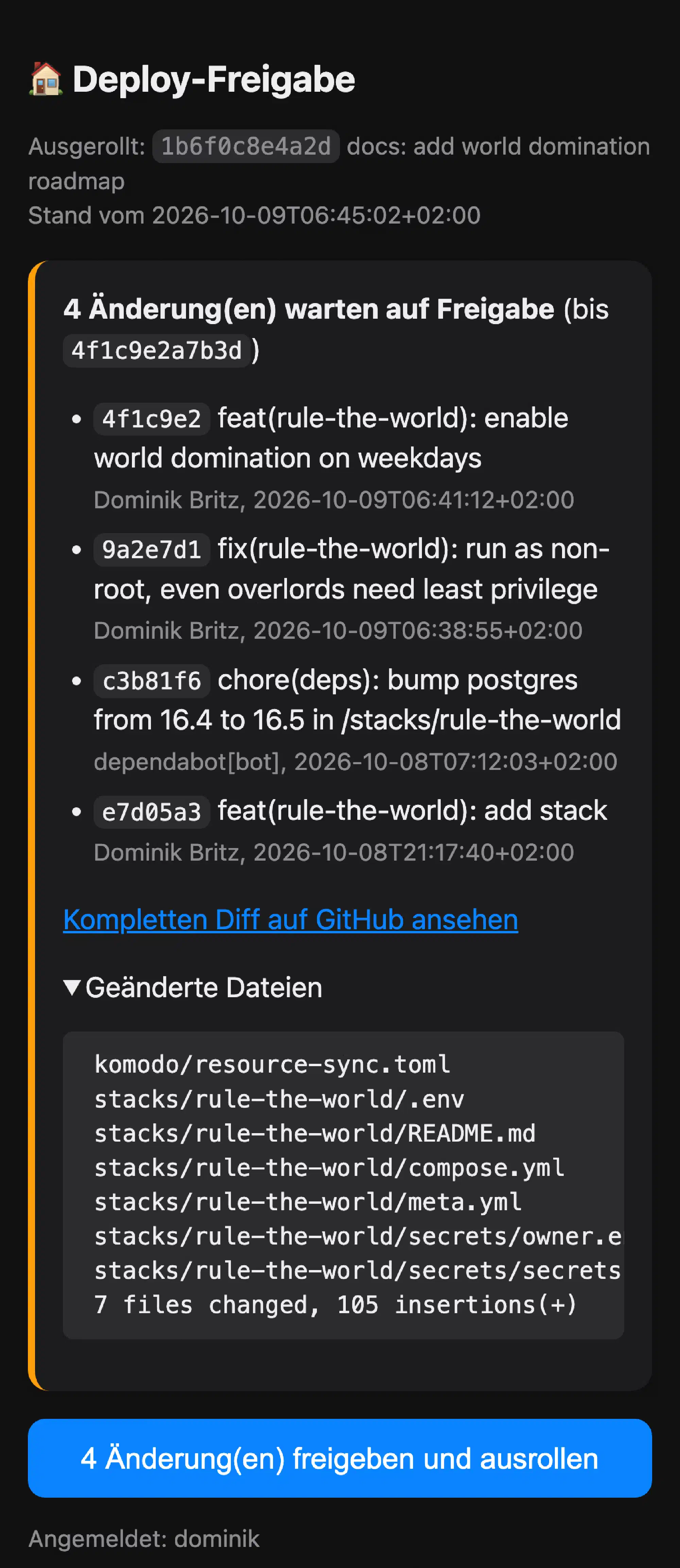
If you want to know how this works under the hood, the full workflow is below.
The full workflow, step by step
Why main Was a Problem#
ansible-pull runs as root. Komodo deploys whatever compose file is on the disk, and whoever controls a compose file controls Docker, which is as good as root. So whoever could write to main was root on my homeserver within an hour.
And quite a few things could write to main. My AI coding agents run on the codebox VM with access to my GitHub account. Hidden instructions in a website, a GitHub issue, or a malicious npm package could have tricked an agent into pushing a harmless-looking change to a compose file. That’s called a prompt injection. The Claude GitHub app could write to the repository. So could any leaked token.
The obvious fix is branch protection: require a pull request and a review for main. But private repositories on GitHub’s free plan don’t support branch protection. And GitHub Pro wouldn’t have helped either: the agents work with my account, and as the repository admin, my account can bypass any rule. Inside GitHub, there is no signal that tells “Dominik approved this” apart from “something with Dominik’s token did this.”
So I moved the decision out of GitHub. GitHub is now just transport. The approval comes from places only I can reach: a signature that can only be created on my Mac, or a button on a page that only exists inside my home network.
Two References: main and deploy#
main stays what it was: the working state. Agents, Dependabot, and I push and merge there all day. What the server deploys is a separate Git tag called deploy. A tag is a named pointer to a specific commit. Mine is signed with the SSH key on my Mac. That key never leaves the Mac, and I never forward my SSH agent to the codebox.
main reaches the server without my approval, from the Mac or from the phone.When I want to roll something out, I run a small script on my Mac. It shows me every commit and a summary of the changed files since my last approval, and asks for confirmation. If I say yes, it signs the deploy tag for that commit and pushes it. If I want the change live right away, I start the service on the server instead of waiting for the timer.
Before signing, the script also checks that the existing deploy tag on GitHub was signed by me. Otherwise, someone could move the tag and hide commits from my summary.
Approving From My Phone#
The signed tag is the strongest path, but it ties every rollout to my Mac. Dependabot’s pull requests arrive on Monday mornings, and I’m not always at my desk. So there’s a second way: the approval page from the screenshot above, which runs on the homeserver itself.
Every five minutes, the server checks main and writes the list of new commits to a file for the page. If something is waiting, my phone gets a push notification. Tapping it opens the page: the commits since the last deploy, the changed files, and a link to the full diff on GitHub. One button approves exactly that state. If something new landed on main in the meantime, the page refuses and shows the updated list.
Approving writes a small file with the commit hash. A systemd path unit notices the file and starts the deploy right away, instead of waiting for the hourly timer.
An approval on this page means root on my server, so the page is locked down accordingly:
- Internal only. It isn’t exposed to the internet, only to my LAN and to devices connected via WireGuard. The codebox can’t reach it either. More on that in the next part.
- Two-factor login, checked twice. Caddy, my reverse proxy, puts the page behind Authelia, my single sign-on server. Before writing an approval, the app asks Authelia again with my session cookie. Other containers on the same Docker network could bypass Caddy and fake the header that tells the app who is logged in. But they can’t present a valid session.
- One user. Only my account may approve, both in Authelia and in the app.
- No JavaScript. Commit messages are written by whoever commits, including agents. The page escapes them, and its Content Security Policy blocks scripts entirely.
- The page doesn’t decide. It only writes a commit hash. The gate on the server, described below, checks it like any other approval.
The app itself is a single Python file that only uses the standard library, running in a read-only container without any Linux capabilities.
The Gate on the Server#
On the homeserver, the hourly service no longer runs ansible-pull directly. It runs a small script, verified-pull, which does this before anything else:
- Fetch
mainand thedeploytag into private references. Nothing is checked out yet. - Verify the tag’s signature. Only SSH signatures from keys in an allowed signers file count. GPG and X.509 are switched off entirely.
- Read the approval from the phone page, if there is one, and make sure its commit is on
main. - Make sure the approved commit is a descendant of the currently deployed one. No rollbacks to an old, vulnerable state, no rewritten history. If both paths approved something, the newest valid approval wins.
- Make sure nobody changed files in the checkout by hand.
- Only then: check out the commit and run the Ansible playbook.
If a check fails, that approval is ignored, nothing new is checked out, and I get a high-priority push notification.
The gate covers Komodo, too. Its resource sync reads komodo/resource-sync.toml from the same verified checkout instead of fetching it from GitHub, so not even Komodo’s own configuration can bypass the approval.
Why not ansible-pull --verify-commit, which exists for exactly this purpose? It verifies the commit after the checkout. In my setup, Komodo deploys straight from the checkout, so an unverified compose file would already be on the disk. Also, --verify-commit checks commit signatures, and when I merge a pull request in GitHub’s web UI, GitHub signs that commit with its own key. A signed tag sidesteps both problems: I sign the result of my review, not every single commit.
One more detail I like: the allowed signers file is itself managed by Ansible from the repository. Could an attacker simply add their own key? No. The change would sit in a commit that never gets checked out unless I approve it, and a new key in the diff is hard to miss.
What This Doesn’t Protect Against#
This setup protects the path to my server. It has limits, and I want to be clear about them:
- My review is now the gate. Whatever I approve runs as root. If I wave through a large batch without reading the diff, the approval only proves that I clicked yes.
- The phone is weaker than the Mac key. Stolen Authelia credentials including the second factor, plus access to my network, would be enough for an approval. So would a security bug in Authelia, Caddy, or the page itself. I accept that trade-off, because it lets me approve a Dependabot update from the couch.
- The tag can be tampered with. Anyone with write access to the repository can delete or move the
deploytag. The server then rejects it and I get an alert. Nothing foreign runs, and a new signature from my Mac fixes it. - Updates wait for me. Before, a Dependabot update went live within an hour of merging it. Now it goes live with my next approval, which bundles everything since the last one.
- The codebox can still write to
main. That’s intended, because that’s how the agents work. Locking down the codebox itself is a separate topic, and I cover it in the next part.
Why Not Something Else?#
| Alternative | Why I didn’t use it |
|---|---|
| Flux or Argo CD | Built for Kubernetes. I run Docker Compose and don’t want a cluster at home. |
| Push mode from GitHub Actions | CI would need root SSH access to my server, and the server would have to be reachable from the internet or through a self-hosted runner. |
| Webhooks to Komodo | An inbound connection from the internet. Pull needs none. |
| Komodo cloning the repository | Two Git consumers instead of one, and the stacks would depend on Komodo. ansible-pull has to stay anyway, because it manages the host. |
| Komodo’s auto-update | It polls image tags, not Git. With pinned images, it never sees a change. |
The common thread: the server reaches out, nothing reaches in. A slow hourly pull is fine for a home server. Dependabot runs once a week, and after an approval from my phone, the server starts right away.
Walkthrough: Adding Tandoor#
Theory is nice, but a real example shows how the parts fit together. Recently, I added Tandoor Recipes to manage our recipes, weekly meal plan, and shopping list. In my setup, an AI agent does most of the following, and I review the result. These are the steps:
1. Scaffold the stack. A script creates the directory with templates for every file:
./scripts/new-stack.sh tandoor2. Write compose.yml. Tandoor and its Postgres database, both as non-root users, every secret as a _FILE variable. Images are pinned with a digest from the start, so Dependabot can pick them up.
3. Fill meta.yml. Three directories (static files, media files, Postgres data with its own owner) and the start page entry.
4. Encrypt the secrets. Write them to a plaintext secrets.yml, encrypt it, and delete the plaintext:
sops --encrypt stacks/tandoor/secrets/secrets.yml > stacks/tandoor/secrets/secrets.yml.sops
rm stacks/tandoor/secrets/secrets.yml
5. Register the stack in a few central places. This is where a new stack touches more than its own directory:
komodo/resource-sync.toml: the[[stack]]block shown above, with--force-recreatebecause of the secret bind mounts.- The
stack-secretsrole: Tandoor goes into the list of stacks with secrets. dependabot.yml: add/stacks/tandoorto the watched directories.- The restic excludes: the static files are regenerated on every start and don’t need a backup.
- Authelia: an OpenID Connect client for single sign-on. I’ll cover that in the part about the public edge.
6. Commit, review, merge. All of this lands in one pull request.
7. Approve. Within five minutes, my phone shows a push notification. I open the approval page, read the list, and tap the button. The server starts right away: it creates the directories, adds Tandoor to the start page, and decrypts the secrets.
8. Sync and deploy in Komodo. The only manual step on the server side: Komodo doesn’t know the new stack yet. I click Execute Sync once to read resource-sync.toml, then deploy the stack for the first time. I kept this step manual on purpose, because the alternative would be another trigger or another inbound connection. New stacks are rare enough.
From then on, every approved change in stacks/tandoor/ redeploys Tandoor automatically.
Lessons Learned#
Pull beats push. Having the server fetch its own configuration removed a whole category of problems: no credentials in CI, no open ports, no runner to maintain.
Keep the executor dumb. Komodo does one job: start containers from files on the disk. All decisions happen in Git and Ansible. That makes Komodo easy to replace and easy to reason about.
Your Git host is not your trust anchor. I assumed “it’s in my private repository” meant “I approved it.” With AI agents writing to that repository, it doesn’t. The question that matters is who can make the server act, and the answer should be me, through a path no agent can reach.
Automation needs a few honest manual steps. A manual sync for new stacks and an approval for every rollout are deliberate friction. Both cost me seconds. Both stop the kind of mistake that would cost me hours.
What’s Next#
This is the second part of the Home Server 2026 series:
- My AI-Managed Home Server in 2026
- My Home Server Deploys Itself From Git (this article)
- Managing my home server with AI: my daily workflow and the guardrails that keep the agents in check, including how I locked down the codebox
- Why I run my coding agents on a Proxmox VM: T3 Code, the codebox, and why it beats cloud sessions for me
- Securing the public edge: two Caddy instances, CrowdSec, passkeys, and split-horizon DNS
- Ransomware-proof backups: restic, B2, and disaster recovery in under two hours
Changelog#
- 2026-10-10: initial version